
Weather App Design: A Home Screen Redesign, Before and After
A junior weather app home screen with nine detail tiles at 9 px and a ten day list, and the same screen fixed. Every change side by side, the reason behind each, and the free Figma file.
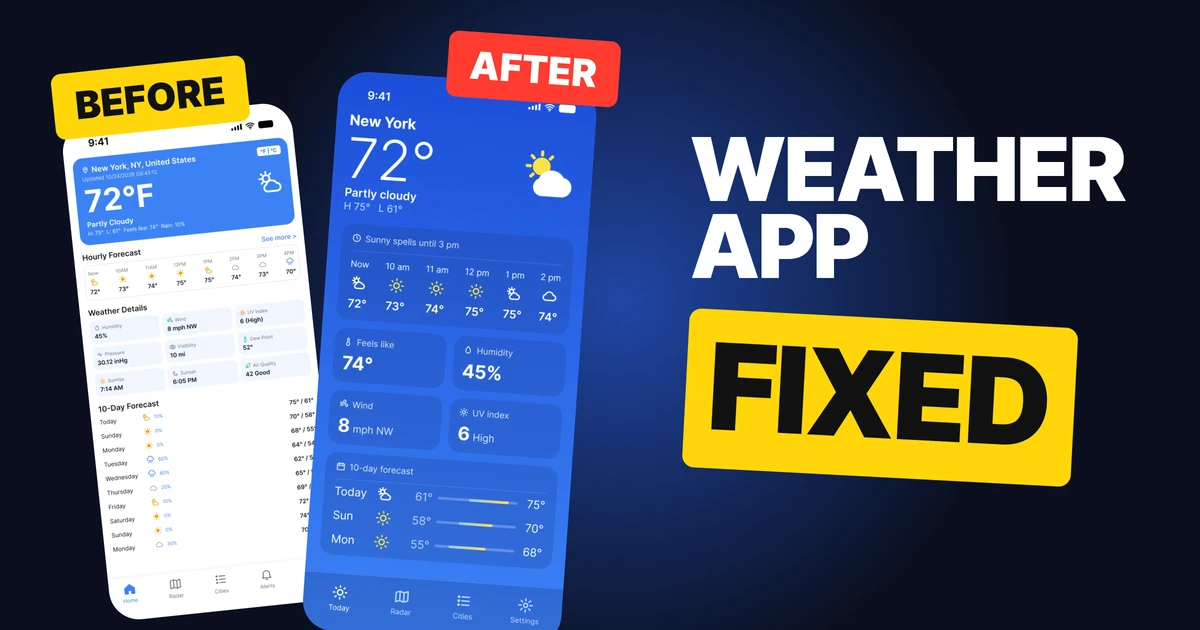
People open a weather app to answer one question: what is it like out, and what will it do next? The first draft below answers it, and then keeps going, because it shows everything the forecast returns: the full place name, a timestamp to the second, nine tiles at 9 px and ten days of colored icons. The fix keeps the same data and decides what the home screen is for.
The whole screen, before and after
Junior draft
Fixed
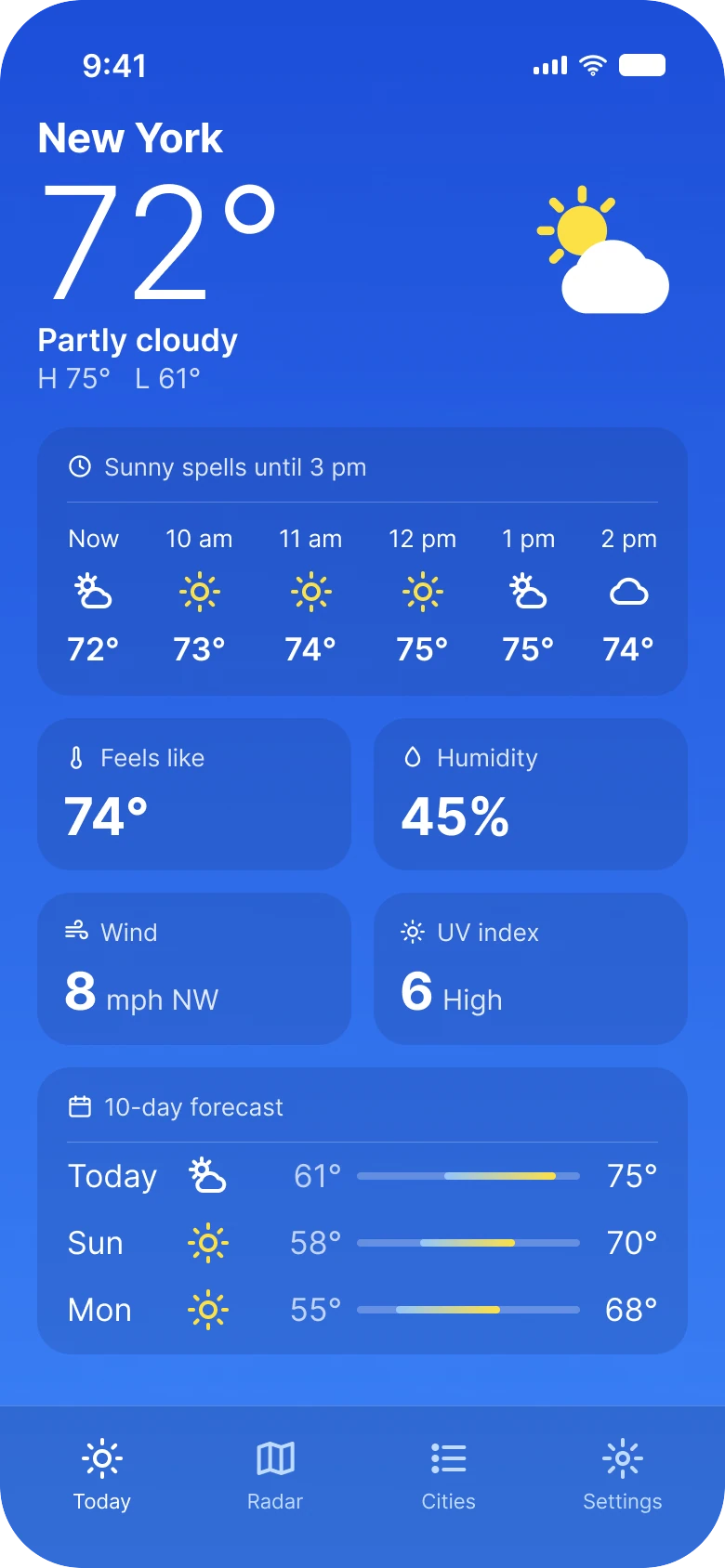
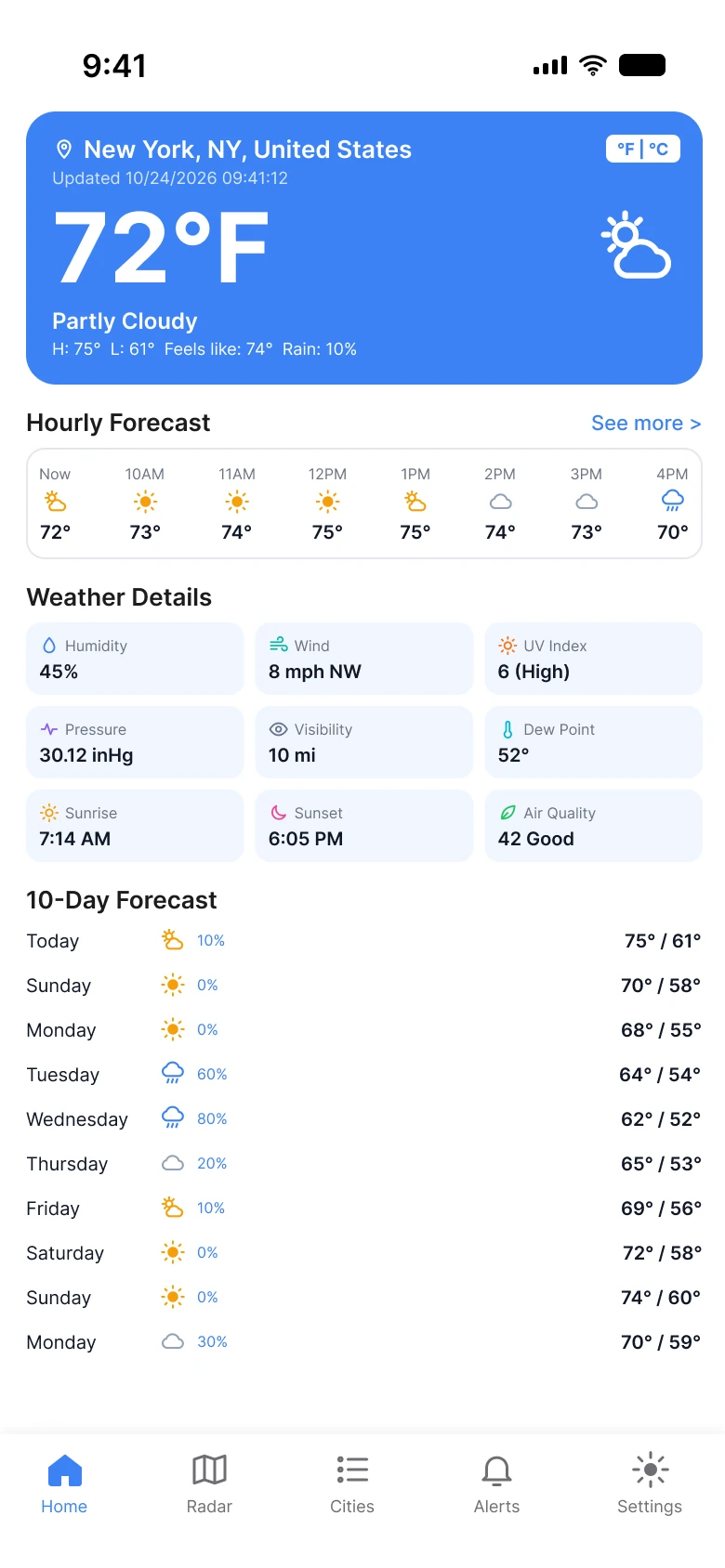
On the left, the first card holds a place name, a timestamp, a unit toggle, a temperature, a condition and four more facts in one small line. Below it are three white boxes of small text. On the right, the top of the screen has three things: the city, the number and the sky. Everything below is a card on the same blue.
Every card on the right starts on the same 20 px left edge, and the condition icon, a yellow sun behind a white cloud, sits on the right of the first block, opposite the number.
| Junior draft | Fixed | |
|---|---|---|
| Temperature | 52 px | 84 px |
| Detail tiles | 9 | 4 |
| Forecast rows | 10 | 3 |
| Tabs | 5 | 4 |
| Side margin | 14 px left, 12 px right | 20 px on both sides |
| Text sizes | 8 to 13 px | 13 to 28 pt |
Fix 1: the city and one big number
Before
After
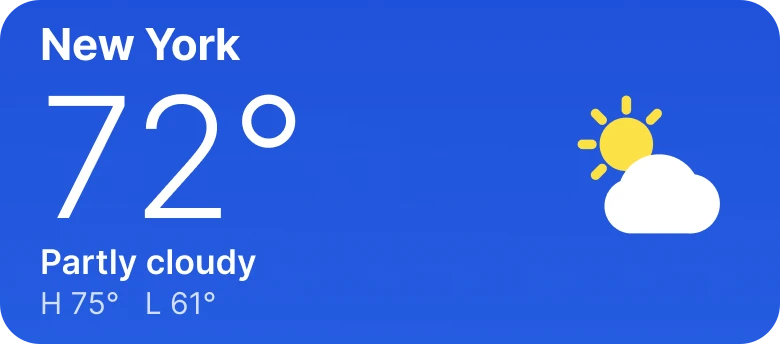
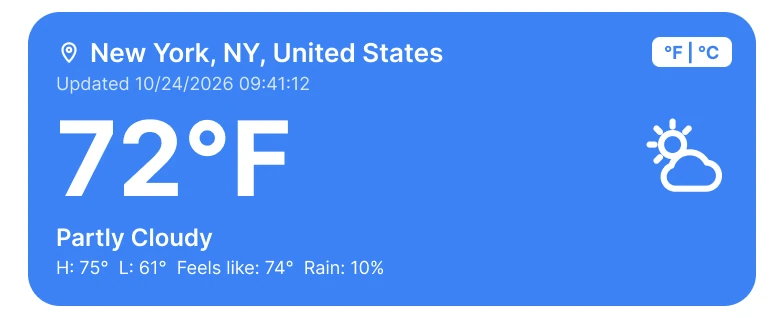
A place name with state and country, a timestamp, a toggle and a small line of facts, against the city, a large number, the sky and the day's range.
The draft's first card is a form for the forecast data. "New York, NY, United States" is three names for one place the person already knows they are in. "Updated 10/24/2026 09:41:12" is accurate to the second and useless to the person: nobody decides what to wear from a timestamp. The unit toggle sits in the corner of the most important card.
The fix says "New York" and "72°" and makes the number 84 px, the biggest thing on the screen, because it is the answer to the question. The sky comes next in words, "Partly cloudy", then the day's range, "H 75° L 61°". Feels-like and rain chance left this block: the feels-like number moved down into the details, which gives it a card of its own.
The rule to reuse: the top of a home screen is for the one answer. Put the data a person would check second one step down.
Fix 2: six hours, one card, room to read
Before
After
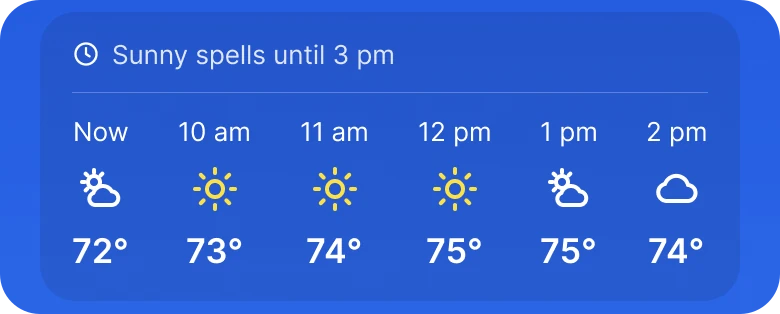
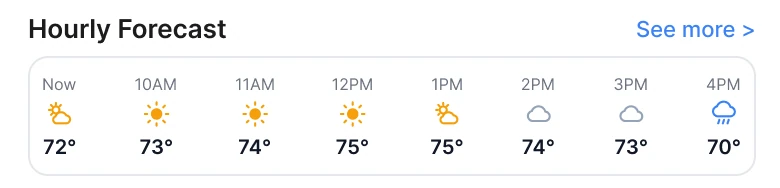
Eight narrow columns in a bordered strip, against six wide ones with a plain-language title.
The draft squeezes eight hours into one row, so every column is thin and the type is tiny. The fix shows six: Now, 10 am, 11 am, 12 pm, 1 pm and 2 pm. With two fewer columns, each hour gets a bigger icon and a bigger number.
The card's title changed from a label to a sentence: "Sunny spells until 3 pm". It tells the reader what the six columns add up to, so they do not need to scan every icon to find when the weather changes.
The rule to reuse: a row of data should have a headline that says what to take from it.
Fix 3: four details, each with a big number
Before
After
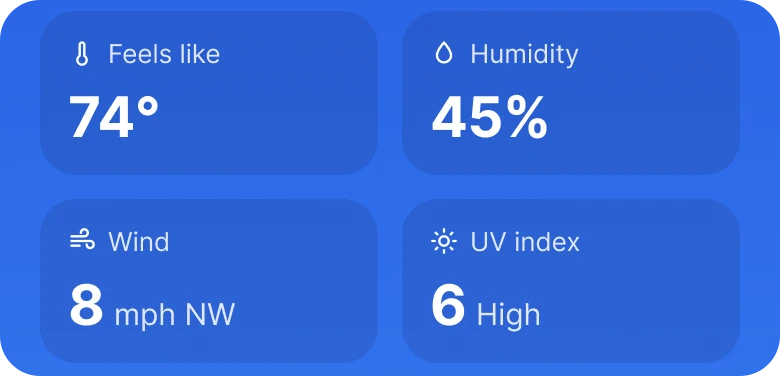
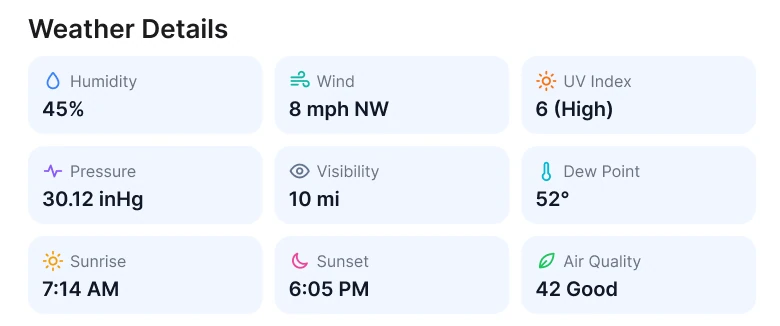
Nine small tiles on a white card, against four larger cards with the number in large type.
Nine tiles at 9 px treat every detail as equal, and none of them can be read at a glance. Pressure, dew point and visibility are real data, but they are not what the fix puts first.
The fix keeps four: feels like, humidity, wind and UV index. Each gets a card, an icon, a small label and a number far larger than the draft's. "6 High" and "8 mph NW" read from arm's length. The other six, pressure, visibility, dew point, sunrise, sunset and air quality, are not on this home screen.
A full weather app still needs somewhere for them, such as a details screen, and this redesign does not draw one.
That is the honest trade. The home screen gets faster to read, and the rest of the data needs a second home.
Fix 4: three days with a bar for each range
Before
After
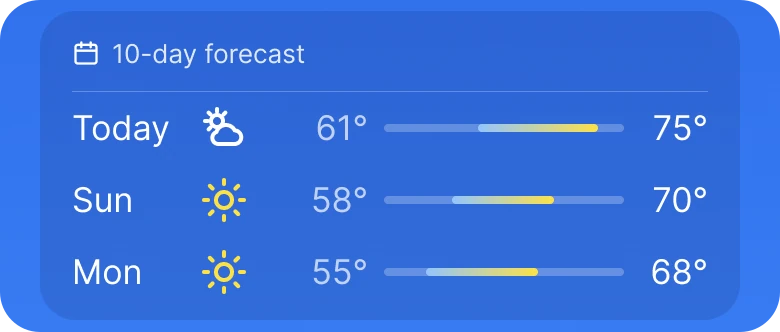
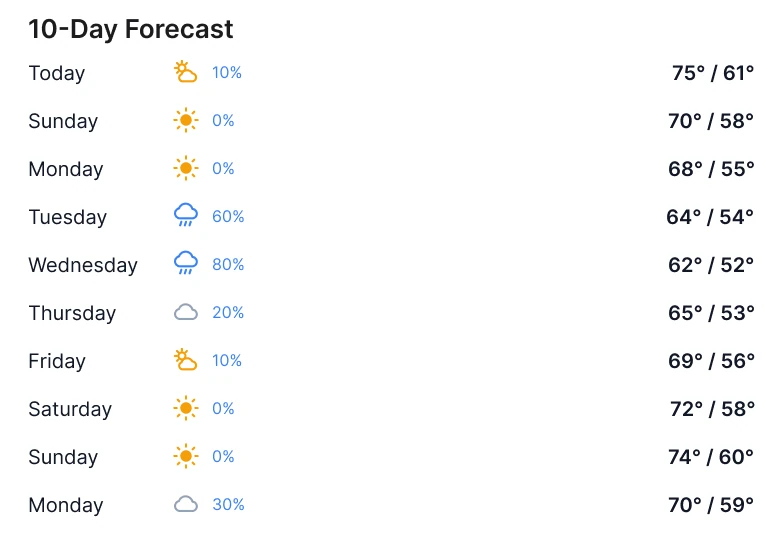
Ten rows of text with a rain percentage and a high and low, against three rows with a bar for each day's range.
Ten rows of "75° / 61°" are ten sums the reader has to compare in their head. Which day is warmest? Where does it turn colder? The answer is in the numbers, and the eye has to dig it out.
The bar does the comparing. Each day's low and high sit on a shared scale from 50° to 78°, so a longer or further right bar means a warmer or wider day, and the color runs from a cool blue to a warm yellow along the bar. The rain percentage left the rows. Saturday, October 24, is "Today"; the next two days follow.
The rule to reuse: when the question is how a series compares, draw the comparison.
The smaller fixes
- One left edge. The draft used 14 px on the left and 12 px on the right, and its blocks did not line up. Every block of the fix starts on the 20 px edge, with 12 px between cards.
- A deeper blue. The sky is a gradient from #1D4ED8 to #3B82F6, the draft's own blue as the lighter end. Cards sit on a navy veil of 24% (#1E3A8A), so they read as part of the sky and not as white boxes on it.
- White text on blue that can be read. The draft's 9 px white text on #3B82F6 is the weakest pair on the screen. Bigger type on the darker cards fixes it.
- A real type scale. Text went from 8 to 13 px to the iOS sizes of 13 to 28 pt, with the 84 px temperature on top.
- Four tabs, not five. The fix removes one tab.
- No unit toggle on the main card. The F and C switch left the first card.
Audit your own weather app
| Question | Why it matters |
|---|---|
| What is the one answer at the top, and is it the biggest thing? | The first glance should be enough |
| Is there any timestamp or label the person never acts on? | Precision is not the same as use |
| Does each row of data have a headline that says what to take from it? | Readers should not hunt for the change |
| Do details have a big number and a clear small label? | Nine equal tiles are all equally ignored |
| Can a list of days become a bar for each range? | The eye compares shapes faster than sums |
Get the Figma file
The free file has both screens as components, every fix as a before and after pair, the color variables and the iOS text styles.
Free Figma file
Weather home screen, before and after
Both screens and every fixed part as Figma components. Free, view only, duplicate it to your drafts.
FAQ
What should a weather app home screen show first?
The city and one big temperature, then the sky and the day's high and low. Everything else is a step down: the next hours, a few details and a short forecast.
How many details should a weather app show on the home screen?
Four is enough for most people: feels like, humidity, wind and UV index. Put pressure, visibility, dew point and sunrise or sunset on a details screen.
How should a weather app show an hourly forecast?
Six or so hours on one card, with big icons and numbers, and a title that says what the hours add up to, such as "Sunny spells until 3 pm".
How do you show a multi-day forecast in an app?
Three days on the home screen, each with a bar from the day's low to its high on one shared scale. Longer lists belong on their own screen.
What font size should a weather app use?
Use the platform's text scale, such as iOS text sizes, and keep the temperature far larger than anything else. The fixed screen runs from 13 to 28 pt with an 84 px temperature.
Sources
- Both screens are our own, designed and measured in Figma. The place, temperatures and dates are made up for the exercise.
- Contrast checked with the WCAG 2.2 contrast formula: white text is at 4.6:1 or better on every fixed card, and the draft's 9 px white text on #3B82F6 is 3.7:1.
- Apple Human Interface Guidelines: Typography, for the iOS text sizes used in the fixed screen.
- First published as a carousel on App Brainy.
Want this for your own app? Our team redesigns app screens like this one, from the first audit to the finished components.
Get StartedGet new papers by email
New Brainy papers in your inbox. Confirm once, unsubscribe anytime.