Logo Design Tools: What Beginners Use vs What Pros Use
Six jobs in making a logo and the tool for each: Procreate for sketching, Illustrator for the logo itself, Savee for inspiration, Adobe Fonts for type, Adobe Color for colors and Figma for showing the client. What beginners reach for instead, and why it costs them.
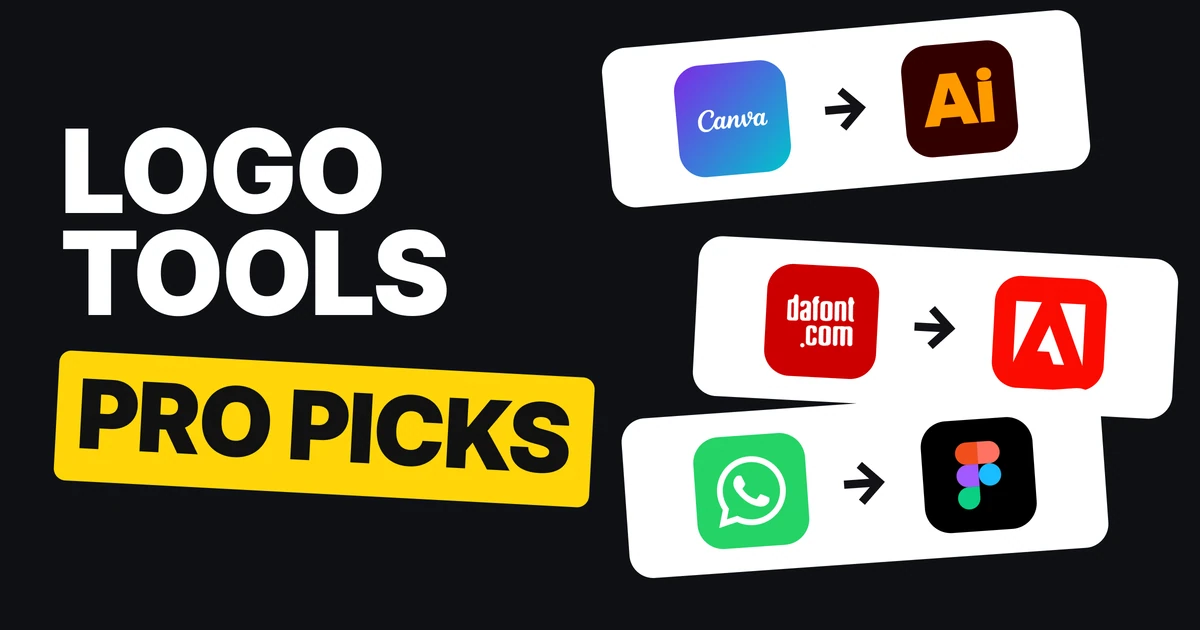
A logo is six jobs, not one: sketching, drawing, finding references, picking a font, choosing colors and showing it to a client. Beginners tend to do all six in whatever app is already open. Pros use one tool per job, and each choice avoids a specific problem you only meet later.
| Job | Beginners use | Pros use | What the pro tool avoids |
|---|---|---|---|
| Sketching | Canva | Procreate | A first idea that looks finished too soon |
| The logo itself | Canva | Adobe Illustrator | A template anyone else can use, which you cannot trademark |
| Inspiration | Savee | Ads and copies of copies | |
| Fonts | DaFont | Adobe Fonts | A license you have to verify yourself |
| Colors | Coolors | Adobe Color | A palette that looks good and fails as text |
| Showing the client | Figma | A logo judged at thumbnail size |
This is our pick, and the beginner tools are not bad software. Each one is simply built for a different job than the one people use it for.
Sketching: Procreate, not Canva
Beginners: Canva
Pros: Procreate
A sketch should look rough, because rough is cheap to throw away. Canva gives you clean shapes and real fonts from the first click, so the first idea already looks like a logo and you stop looking for a better one. In Procreate, or on paper, twenty ideas cost an hour and none of them pretends to be final.
Do this: fill a page with small, fast thumbnails before you open any vector tool. Pick the three that still read at the size of a fingernail. Our logo design process puts this step before everything else for the same reason.
The logo itself: Illustrator, not Canva
Beginners: Canva
Pros: Illustrator
This is the swap with legal weight. Canva's own help page says its logo templates can be used by anyone, so the rights are not exclusive and a logo built from one cannot be registered as a trademark. Its licensing page adds that library content from the Free or Pro plans cannot go into a trademark at all, apart from fonts and simple shapes and lines. Illustrator starts from a blank page, so every curve is yours.
Illustrator also draws vectors: points and curves that stay sharp from a favicon to a billboard. That is why the master file of a logo is an AI, SVG or PDF and never a PNG. See logo file formats explained for which file goes where.
Inspiration: Savee, not Pinterest
Beginners: Pinterest
Pros: Savee
Pinterest mixes ads into the feed, and a logo board there fills up with reposts of reposts, often with no name attached. Savee describes itself as references chosen by designers, without ads or clutter. A smaller, curated feed shows you fewer logos and better ones.
Do this: whatever you save, keep the source. A reference you can trace back to its designer can go in a brief. For studying famous marks with their story, use the six sites in our logo inspiration sites paper.
Fonts: Adobe Fonts, not DaFont
Beginners: DaFont
Pros: Adobe Fonts
DaFont's own FAQ says the license shown above each download button is "just an indication". You have to find the real terms from the font's author yourself, and many free fonts there are for personal use only. Adobe's licensing FAQ says every Adobe Fonts typeface is cleared for personal and commercial use, and that you can trademark a logo made with one. The typeface itself stays Adobe's or the foundry's; the logo is yours.
A free font can be fine. Google Fonts uses open licenses that allow commercial use, which is why it is not on the beginner side here. The mistake is not "free", it is "unchecked". For how a typeface carries a brand, read typography in branding, and for real examples, the fonts behind famous logos.
Colors: Adobe Color, not Coolors
Beginners: Coolors
Pros: Adobe Color
A random palette from the spacebar can look lovely as five stripes and still fail the moment your logo text sits on it. Adobe Color has a contrast analyzer built in: put the logo color on its background and it tells you whether text in that pair passes the accessibility guidelines.
Do this: test every pair the logo will actually use, mark on background and reversed. Then build the rest of the palette around the pairs that pass. Our brand color palette guide covers that step, and accessible color contrast explains the rule behind the checker.
Showing the client: Figma, not a chat
Beginners: WhatsApp

Pros: Figma
A logo sent in a chat is seen as one small image between messages, and it gets judged at that size. In Figma you lay it out on the things it will live on, a business card, a sign, an app icon, a phone screen, all on one page with one link. The client judges the brand, not a thumbnail.
What goes on that page, and in what order, is in our paper on presenting a brand identity to clients.
The pro stack, one tool per job
Sketch
ProcreateOr paper and a pencil
✓ Rough on purpose
Draw
Adobe IllustratorVectors, from a blank page
✓ Yours to trademark
Collect
SaveeCurated, no ads
✓ Fewer, better references
Type
Adobe FontsCleared for logos
✓ No license guesswork
Color
Adobe ColorContrast checker built in
✓ Pairs that pass
Present
FigmaOne page, real mockups
✓ Judged at real size
You do not need all six on day one. A sketchbook and Illustrator cover the two jobs that decide whether the logo is good and whether it is yours. Add the others as the work asks for them.
FAQ
What software do professional logo designers use?
Most professional logos are drawn as vectors in Adobe Illustrator. Around it, designers sketch in Procreate or on paper, pick type from a licensed library such as Adobe Fonts, check colors with a contrast tool and present in Figma.
Can you trademark a logo made in Canva?
Not one built from a Canva template. Canva's help center says its logo templates are available to everyone, so the rights are not exclusive and the logo cannot be registered as a trademark.
Are DaFont fonts free for commercial use?
Not by default. DaFont's FAQ says the license label above the download button is "just an indication", so check the author's own terms before putting a DaFont font in a logo.
Can I use Adobe Fonts in a logo?
Yes. Adobe's font licensing FAQ says Adobe Fonts are licensed for commercial use and that you can trademark the logo itself. The typeface stays the foundry's.
What is the best app for sketching logo ideas?
Procreate on an iPad, or paper. Anything that keeps the idea rough works, because a rough sketch is easy to throw away.
Is Canva good for logo design at all?
It is fast for mockups and social graphics. For the logo itself, start from a blank page in a vector tool so the mark is original and yours to protect.
Sources
- Canva Help Center, Trademark logos created on Canva: templates are non-exclusive and cannot be registered as a trademark; Canva's Licensing explained page on Free and Pro content in trademarks.
- DaFont, FAQ: "The licence mentioned above the download button is just an indication." Read 6 November 2026.
- Adobe, Font licensing FAQs: Adobe Fonts are licensed for personal and commercial use; a logo made with them can be trademarked.
- Savee, savee.it: "references chosen by designers ... without ads or clutter".
- Pinterest, Pinterest Ads: ads run in the feed.
- Adobe Color, contrast analyzer.
- The tool marks shown are the companies' own files, never redrawn: Canva wordmark from canva.com, Adobe Illustrator icon and Adobe logo from Wikimedia Commons, Figma logo from Wikimedia Commons, Pinterest and WhatsApp glyphs from Simple Icons, Procreate, Savee, DaFont and Coolors icons from their own sites. Trademarks of their owners.
- First published as a carousel on Logo Brainy.