
Error Message Color: Why #FF0000 Fails and the 8 Reds to Use Instead
Pure red is the first error color everyone picks and the wrong one for text. The four fixes, the eight light and dark error colors, and the code to hand your developer.
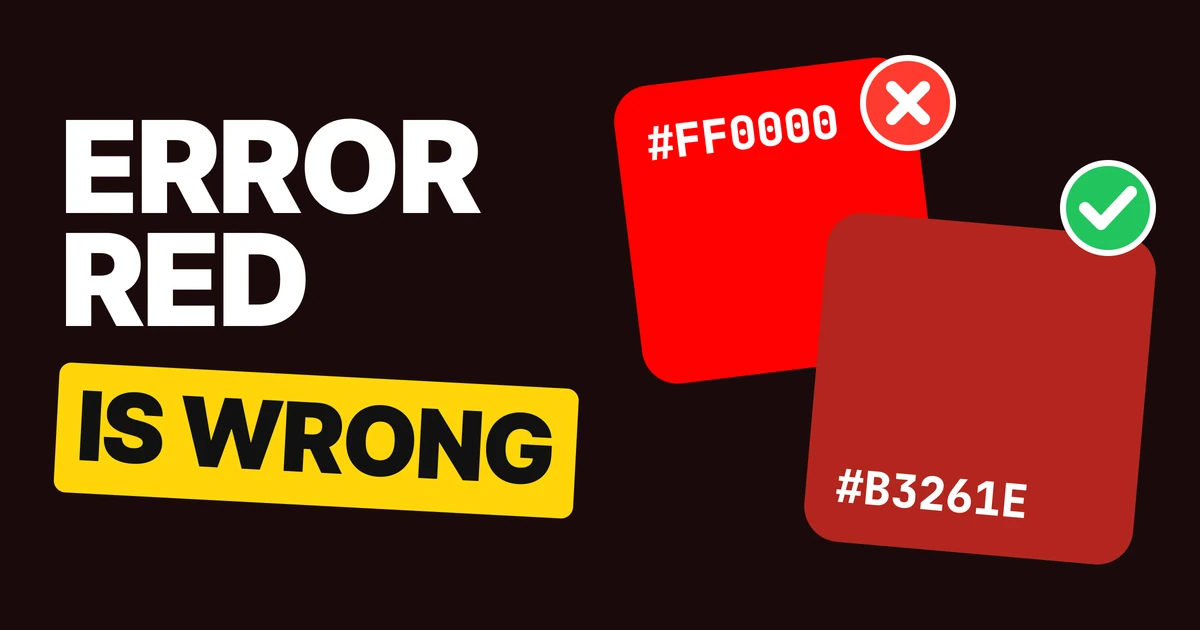
The right error color for text is a darker red, not #FF0000. Pure red looks loud and still reads poorly at the small sizes error messages use, and it buzzes on dark screens. Here are the four fixes, the eight colors to use in light and dark mode, and the code to hand your developer.
Why pure red fails
Nobody chooses #FF0000 for error text. It arrives. It is the red in the top row of every color picker, the red keyword in CSS, the first swatch in a new design file. So it ends up on the one line of the screen that has to be read correctly the first time.
Pure red is bright and saturated, so it looks strong, but it is not dark. Its lightness is close to a mid gray. Set it small on white and the letters lose their edges.
The fix is not a different hue. It is the same red, pushed darker until the text has weight.
Fix 1: darken the red for text
Enter a valid email address.
✕ #FF0000 on white: hard to read
Enter a valid email address.
✓ #B3261E on white: easy to read
Same field, same message, two reds. The right one is Material 3's light theme error color, and it is the one your eye lands on, even though the left one is the "redder" red.
Use the darker red for every piece of error text: the message under a field, a label that turns red, an inline "Required" tag. Keep #FF0000 out of text entirely. If your brand red is close to pure red, keep it for illustrations and large display type, where size does the work that darkness does in small text.
Fix 2: tint the banner, don't paint it
✕ White on #FF0000: shouts, still hard to read
✓ #410E0B on #F6CBC8: easy to read
A solid red bar with white text is the loudest thing on the page and it is still hard to read, because white on #FF0000 has the same weak contrast as #FF0000 on white. The colors swapped places, the problem did not.
A soft red container with dark red text says "error" through its color and lets the words be read. The urgency comes from the icon and the message. Material's own container is a paler #F9DEDC; we use one step deeper, #F6CBC8, because the paler pink washes out next to dark interface chrome.
Fix 3: soften it on dark screens
Enter a valid email address.
✕ #FF0000 on dark: buzzes
Enter a valid email address.
✓ #F2B8B5 on dark: calm and clear
Dark mode flips the advice. Pure red on near-black passes the contrast minimum, so a checker will not flag it, but a saturated red on dark gray vibrates at its edges. Material's dark theme uses a light, soft error red, #F2B8B5, which keeps the same relationship to the dark background that #B3261E has to white.
This is the general rule for dark themes: saturated colors that work on white get lighter and softer on dark. Our paper on dark mode design covers the rest of the palette.
Fix 4: check it in grayscale
✕ Border only: which field is wrong?
Enter a valid email address.
✓ Icon and words: still obvious
Pure red and a medium gray have almost the same lightness, so a field whose only error signal is a red border looks, in grayscale, like every other field. Turn your screen to grayscale once before you ship a form (System Settings, Accessibility, Display, Color Filters on a Mac; the same filter sits in the accessibility display settings on iOS and Android).
Every error state needs three things:
- A color: the darker red on light, the softer red on dark.
- A shape: an icon in front of the message, visible without color.
- Words: what went wrong and what to do. "Enter a valid email address" beats "Invalid input".
This is WCAG 1.4.1, use of color: color can support a message, never be the only way it is given.
The 8 error colors, light and dark
Tap any chip to copy its code.
| Role | Light | Dark | Use it for |
|---|---|---|---|
| Error | #B3261E | #F2B8B5 | Error text, error borders, the error icon |
| On error | #FFFFFF | #601410 | Text on a solid error fill, like a Delete button |
| Error container | #F6CBC8 | #8C1D18 | Banners, toasts and inline alert boxes |
| On error container | #410E0B | #F9DEDC | Text and icons inside those containers |
Hand this to your developer
The same eight colors as CSS custom properties, with the dark values switching on the system theme:
:root {
  --color-error: #B3261E;
  --color-on-error: #FFFFFF;
  --color-error-container: #F6CBC8;
  --color-on-error-container: #410E0B;
}

@media (prefers-color-scheme: dark) {
  :root {
    --color-error: #F2B8B5;
    --color-on-error: #601410;
    --color-error-container: #8C1D18;
    --color-on-error-container: #F9DEDC;
  }
}

.field--invalid { border-color: var(--color-error); }
.field__error { color: var(--color-error); }
.alert--error {
  background: var(--color-error-container);
  color: var(--color-on-error-container);
}
On Material, these roles already exist as colorScheme.error, onError, errorContainer and onErrorContainer; the only change from the default is the deeper light container. On anything else, the four names are worth stealing: they stop the next person from reaching for #FF0000.
The contrast numbers
WCAG 2 asks for at least 4.5 to 1 for body text.
| Pair | Contrast |
|---|---|
| #FF0000 text on white | 4.0 to 1, under the minimum |
| #B3261E text on white | 6.5 to 1 |
| White text on #FF0000 | 4.0 to 1, under the minimum |
| #410E0B text on #F6CBC8 | 11.1 to 1 |
| #F2B8B5 text on dark #141218 | 10.9 to 1 |
| #FF0000 text on dark #141218 | 4.7 to 1, passes and still vibrates |
The last row is why a checker is not enough. Pure red on dark technically passes and is still the wrong choice.
FAQ
What color should error messages be?
A dark red that is easy to read at small sizes, such as #B3261E on a white background. Pair it with an icon and a message that says how to fix the problem.
Is #FF0000 accessible for error text?
No. Pure red on white has a contrast of about 4.0 to 1, under the 4.5 to 1 that WCAG asks for body text, and error messages are usually small.
What is the error color in Material Design 3?
The light theme error role is #B3261E with #FFFFFF on top, the error container is #F9DEDC with #410E0B text. In the dark theme the error role is #F2B8B5 and the container is #8C1D18.
What color should errors be in dark mode?
A lighter, softer red such as #F2B8B5. Pure red passes the contrast check on dark backgrounds but vibrates and is uncomfortable to read.
Can an error be shown with color alone?
No. About one in twelve men has some form of color blindness, and WCAG 1.4.1 requires that color is never the only signal. Add an icon and words.
Sources
- Material Design 3 baseline error roles, light and dark, from the Material color roles and the androidx Compose color tokens.
- WCAG 2.2, 1.4.3 Contrast (Minimum) and 1.4.1 Use of Color.
- Contrast ratios computed with the WCAG relative luminance formula. Pure red and #808080 gray have relative luminance of 0.213 and 0.216.
- Color blindness prevalence from the National Eye Institute.
- First published as a carousel on UX Brainy.
Want error states, forms and every other state designed as one system? Our team designs and builds product UI that holds up in light and dark.
Get StartedGet new papers by email
New Brainy papers in your inbox. Confirm once, unsubscribe anytime.