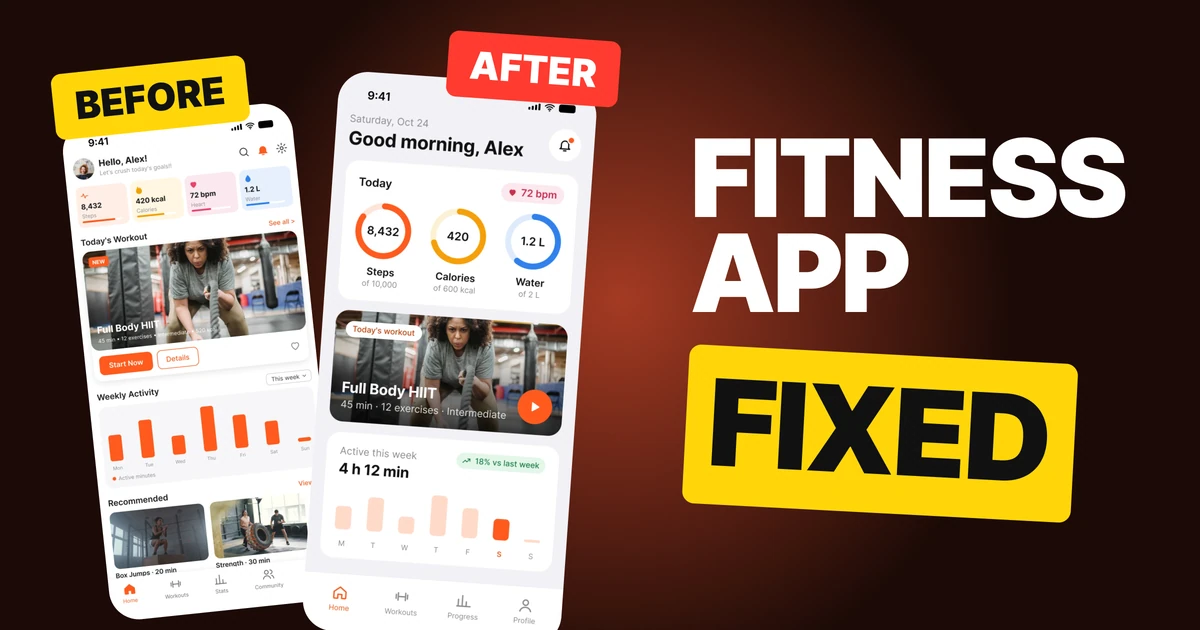

Hotel Booking App Design: A Home Screen Redesign, Before and After
A junior hotel booking home screen that opens with a four-field form, and the same screen fixed. Every change side by side, the reason behind each, and the free Figma file.
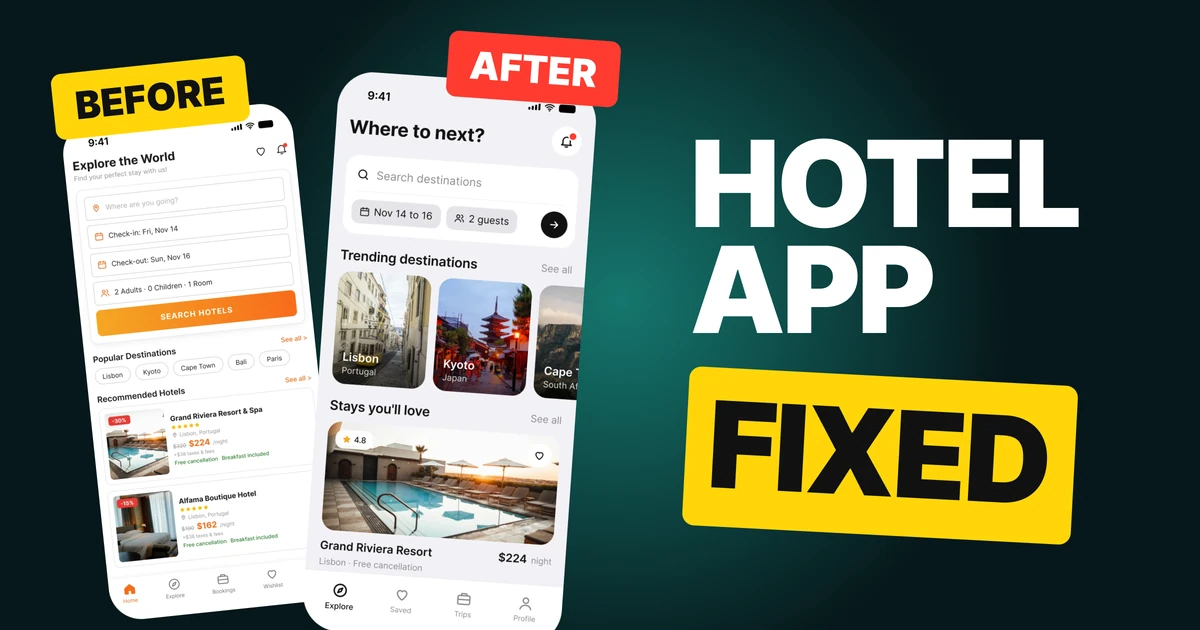
A travel app's home screen has to make someone want to go somewhere before it asks them anything. The first draft below does the opposite: it opens with a four-field form, lists destinations as plain words and spreads one price over six lines. The fix keeps every feature and changes the order of what you see.
The whole screen, before and after
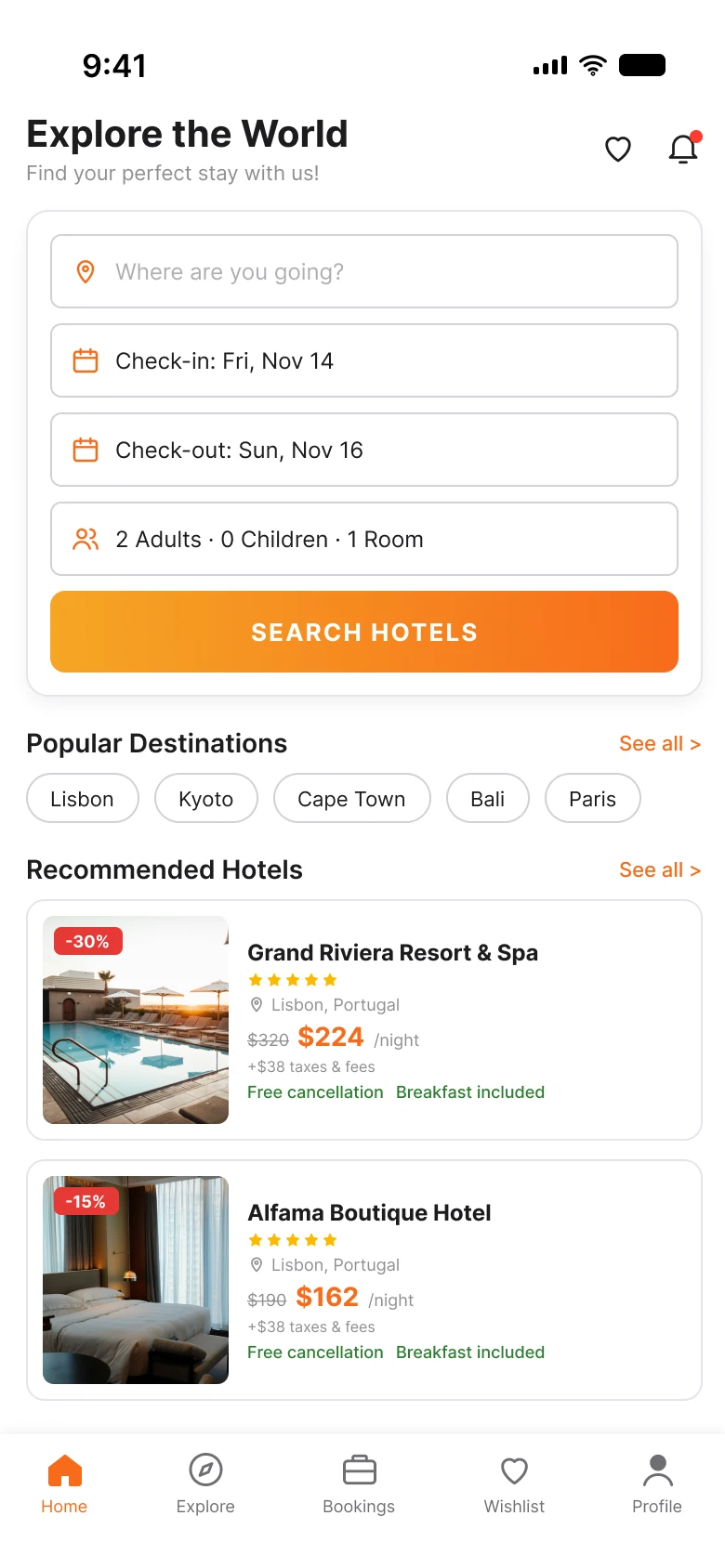
Junior draft
Fixed
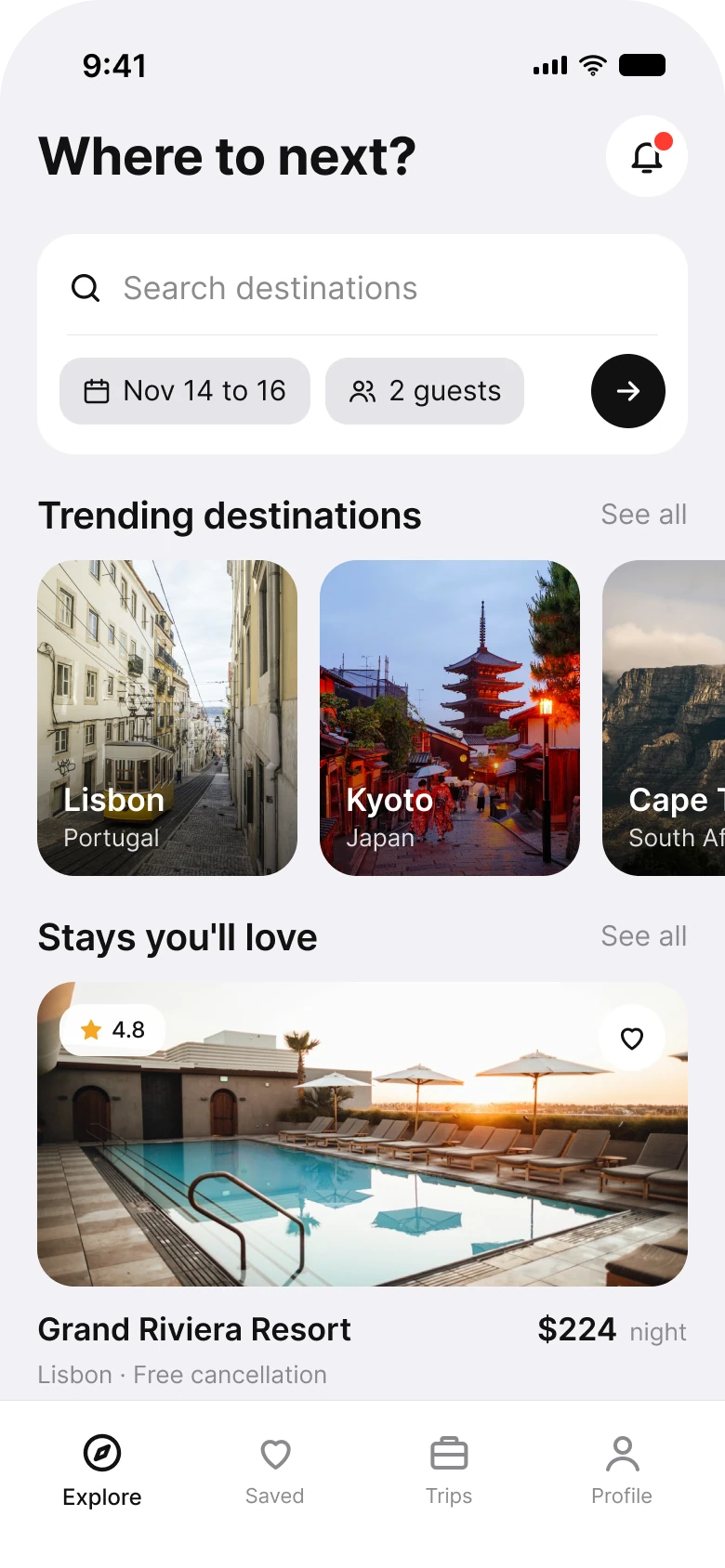
On the left, the first thing on the screen is a job: where, check-in, check-out, guests, then a gradient button. Places appear only after the form, as five grey pills of text. On the right, the search is one card, and more than half the screen is photographs of places and stays.
Every feature survived. You can still search by place, dates and guests, browse destinations and see hotel prices. The fix moved the paperwork into one compact card and gave the space back to the reason people open a travel app.
| Junior draft | Fixed | |
|---|---|---|
| Inputs before any content | 4 fields and a 44 px button | 1 field and 2 chips |
| Destinations | 5 text pills | Photo tiles with city and country |
| Lines of price on each hotel card | 6 | 1, plus one detail |
| Header | A slogan and two icons | A question and one icon |
| Tabs | 5 | 4 |
Fix 1: ask the question, drop the slogan
Before

After

"Explore the World, Find your perfect stay with us!" next to a heart and a bell, against "Where to next?" next to a bell with a dot.
A slogan on a home screen is written for the company. A question is written for the person holding the phone, and it points straight at the search card below it. "Where to next?" is also what a friend would ask, which is the tone a travel app wants.
The heart left the header because saved places already have their own tab. The bell stayed, with a dot when there is something new, because a price drop or a booking change is the one thing worth interrupting for.
Fix 2: one search card, dates and guests as chips
Before
After
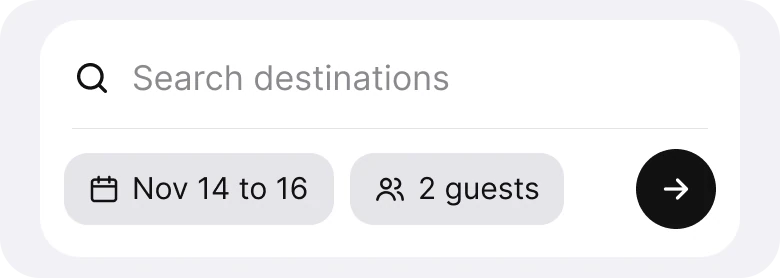
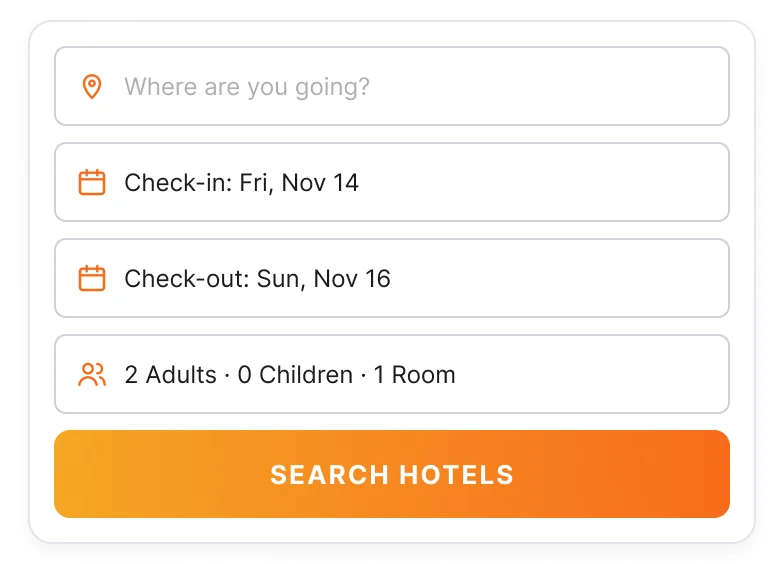
Four stacked fields (destination, check-in, check-out, guests) and an orange gradient button, against one destination field with "Nov 14 to 16" and "2 guests" as chips and a round arrow button.
The four-field form asks a person to make every decision before they have seen a single place. Most people opening the app are not ready to: they are browsing. A form that takes up a third of the screen is a wall for them.
Dates and guests rarely change between searches, so the fix shows them as chips with sensible defaults, tappable when they need changing. The destination is the only field that needs typing. The check-in and check-out pair becomes one chip, "Nov 14 to 16", because nobody thinks of a stay as two separate dates.
Fix 3: show places, not names
Before

After
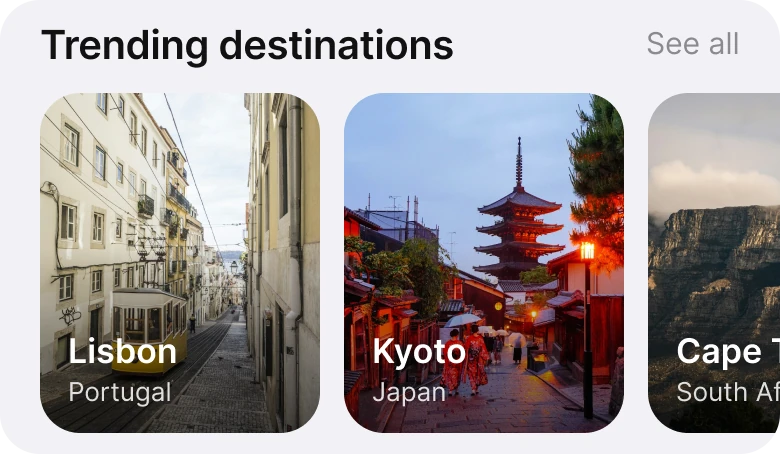
"Lisbon, Kyoto, Cape Town, Bali, Paris" as grey text pills, against photo tiles of Lisbon and Kyoto with the country under each name, the next tile peeking in from the edge.
People choose a destination with their eyes. A word like "Kyoto" asks the reader to imagine the place; a photo of a pagoda at dusk does the imagining for them. That is the whole job of this section, and text pills cannot do it.
The tile cut off at the right edge is deliberate. It tells the reader the row scrolls without needing arrows or dots, so there are more places to discover with one swipe.
Fix 4: one price per stay
Before
After
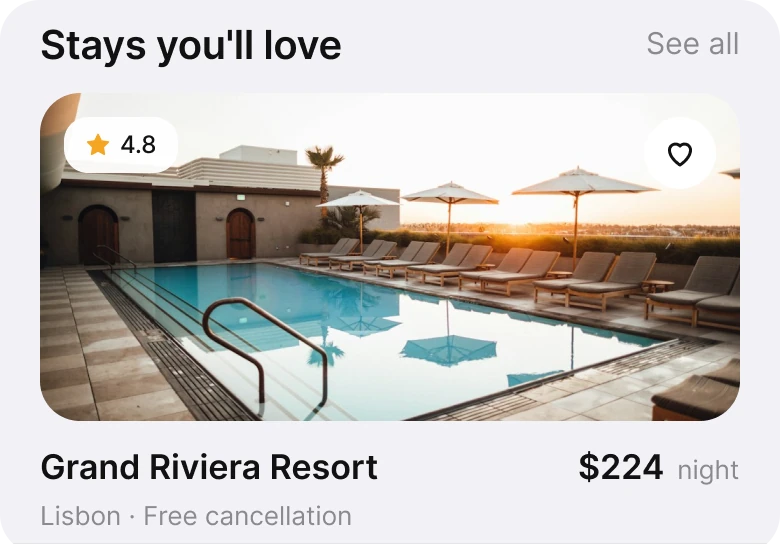
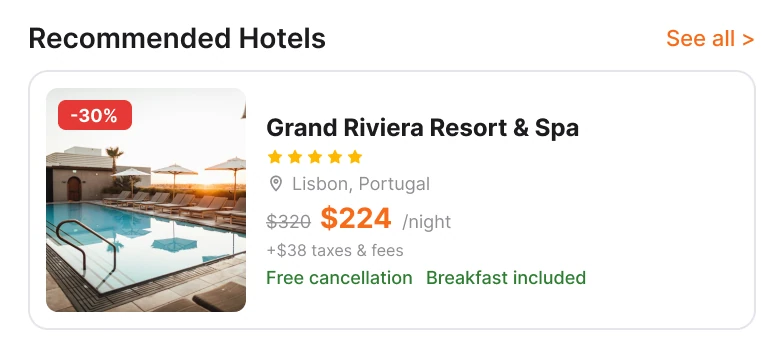
A small thumbnail with a -30% badge, five stars, the city, a crossed-out $320, $224 per night, "+$38 taxes and fees" and two green perks, against a large photo with a 4.8 rating, the name, "$224 night" and "Lisbon, Free cancellation".
The draft card shows the price four ways at once: the old price, the new price, the unit and the extra fees, plus a discount badge on the photo saying it a fifth time. The reader has to do the maths before they can decide if they like the hotel.
The fix shows one number and one detail. The photo is bigger because the photo is what sells the stay. The detail is the one that removes the most worry, free cancellation, and the rating replaces five drawn stars with a number you can compare.
The smaller fixes
- Four tabs, not five. Explore, Saved, Trips and Profile. Home and Explore merged into one tab, Explore, because the home screen is where exploring happens.
- Words people use. "Wishlist" became "Saved" and "Bookings" became "Trips", the words travellers actually say.
- One accent. The draft used an orange gradient for the button, green for perks and red for discounts. The fix uses black for actions and lets the photos bring the color.
- Shorter names. "Grand Riviera Resort & Spa" became "Grand Riviera Resort" on the card, so the name fits on one line next to the price.
Audit your own travel app
| Question | Why it matters |
|---|---|
| Can someone see a place before filling in a field? | Browsers outnumber bookers on a home screen |
| Are dates and guests prefilled and editable as chips? | They rarely change between searches |
| Are destinations photos? | People pick places with their eyes |
| Does each stay show one price? | Four prices make the reader do maths |
| Do any two tabs lead to the same place? | Duplicate doors make people unsure |
Get the Figma file
The free file has both screens as components, every fix as a before and after pair, the color variables and the iOS text styles.
Free Figma file
Hotel booking home screen, before and after
Both screens and every fixed part as Figma components. Free, view only, duplicate it to your drafts.
FAQ
What should a hotel booking app home screen show first?
A short question, one search field and photos of places. Dates and guests can sit in the search card as editable chips, so browsing comes before any form.
How should hotel prices be shown in an app?
One clear price per stay, with one supporting detail like free cancellation. Where mandatory fees apply, include them in the headline price.
Should a travel app show destinations as photos or text?
Photos. People choose places visually, and a tile cut off at the screen edge shows the row scrolls without extra controls.
How many tabs should a booking app have?
Four or five. Merge any two tabs that lead to the same place, and name tabs with the words travellers use, like Saved and Trips.
Sources
- Both screens are our own, designed and measured in Figma.
- Photos via Unsplash by Vali Sachadonig, Zion C, Asher Pardey, Roberto Nickson and Travis Chen.
- FTC rule on unfair or deceptive fees, covering short-term lodging, effective May 12, 2025.
- First published as a carousel on App Brainy.
Want this for your own app? Our team redesigns app screens like this one, from the first audit to the finished components.
Get StartedGet new papers by email
New Brainy papers in your inbox. Confirm once, unsubscribe anytime.