
Wireframe vs Prototype: What's the Difference and When to Use Each
A wireframe tests the layout. A prototype tests the flow. The one question that decides it, the same recipe screen built both ways, and a decision table for twelve moments in a project.
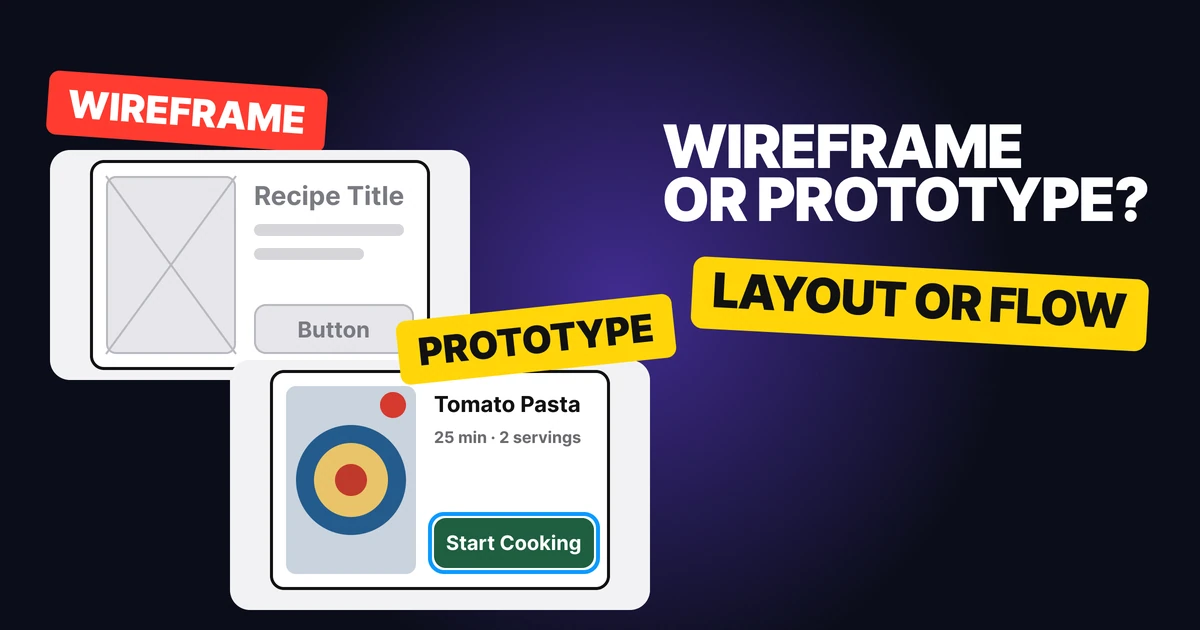
Wireframes and prototypes both come before the real product, so teams use the words as if they meant the same thing. They answer different questions. One settles where things go on a screen, the other shows what happens when someone uses it. Below: the question that decides it, one recipe screen built both ways, and a decision table you can bring to a project kickoff.
The one question: are you testing the layout or the flow?
Ask what you need to learn this week. If the open question is where things sit on one screen, any detail beyond boxes and lines is wasted, because it will move. If the open question is whether people get from one screen to the next, a static picture cannot answer it, because nothing on a picture can be tapped.
Everything else follows from that. A wireframe is fast because it leaves out color, photos and real copy. A prototype takes longer because it adds the one thing a wireframe never has: something happens when you press it.
The same screen, both ways
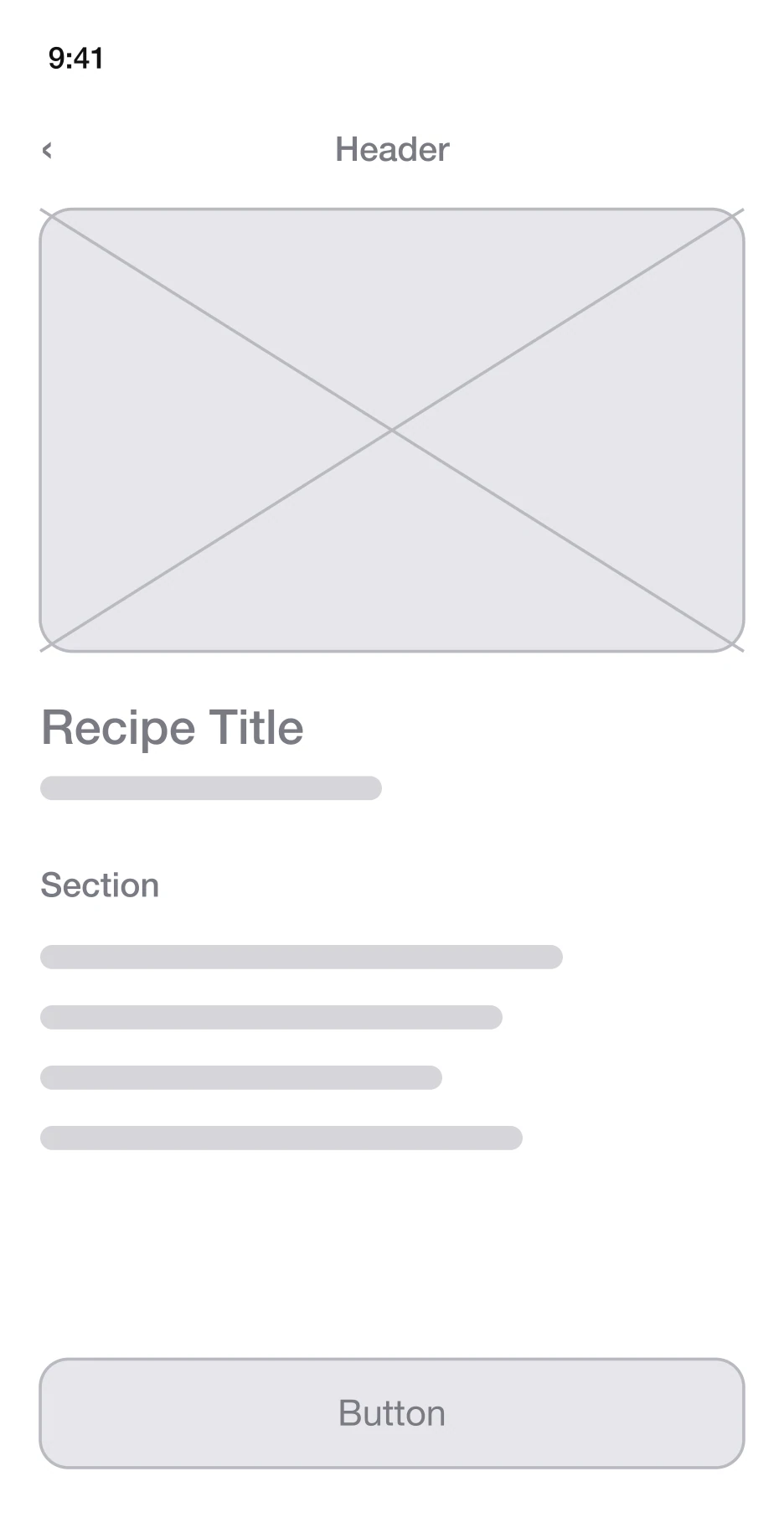
Wireframe: the layout
Prototype screen: the finished look
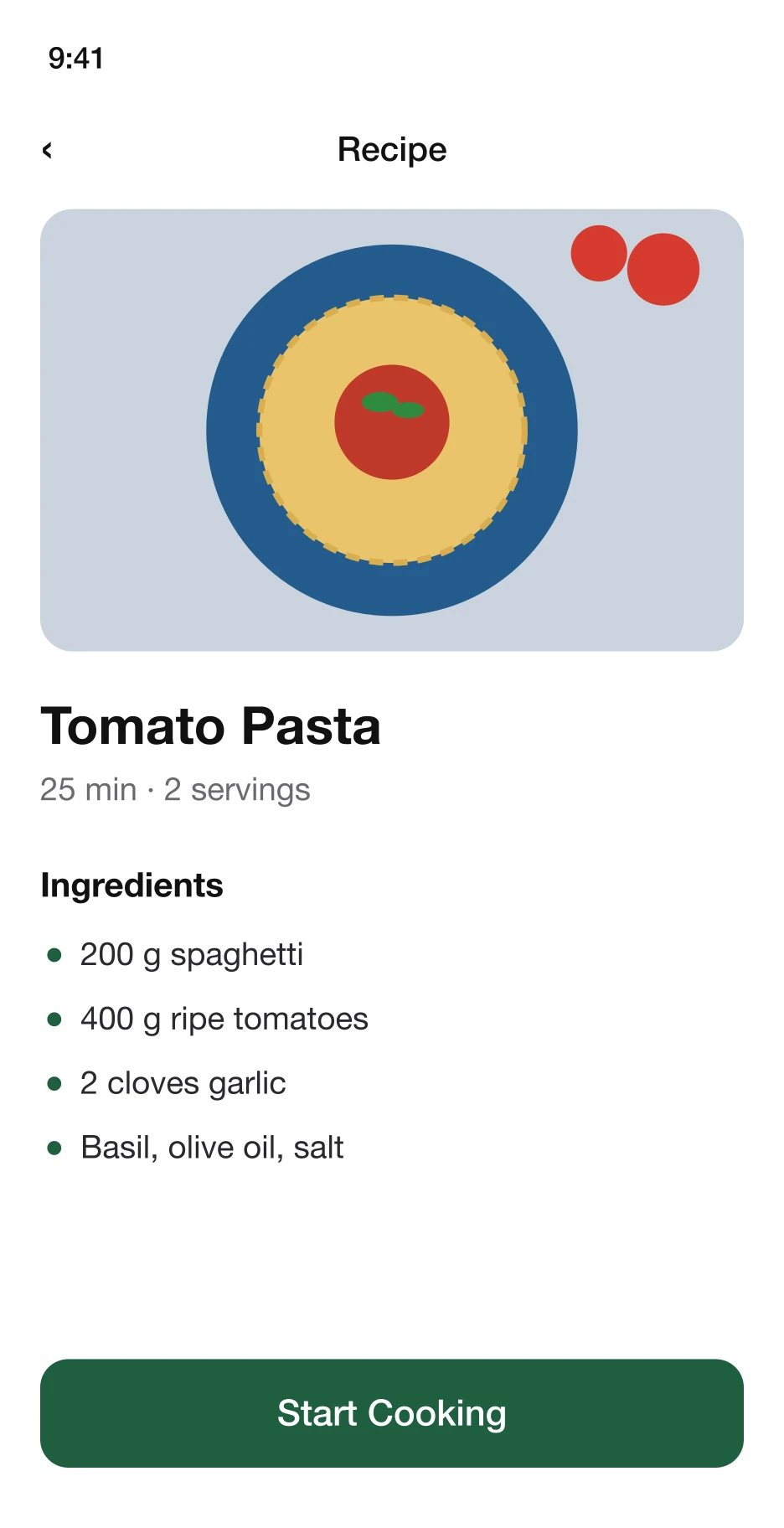
Put the two side by side and the division of labor is plain. Nothing on the left asks anyone to judge a color or a photo. Everything on the right is there so a person forgets they are looking at a design and starts cooking.
The wireframe: decide the layout
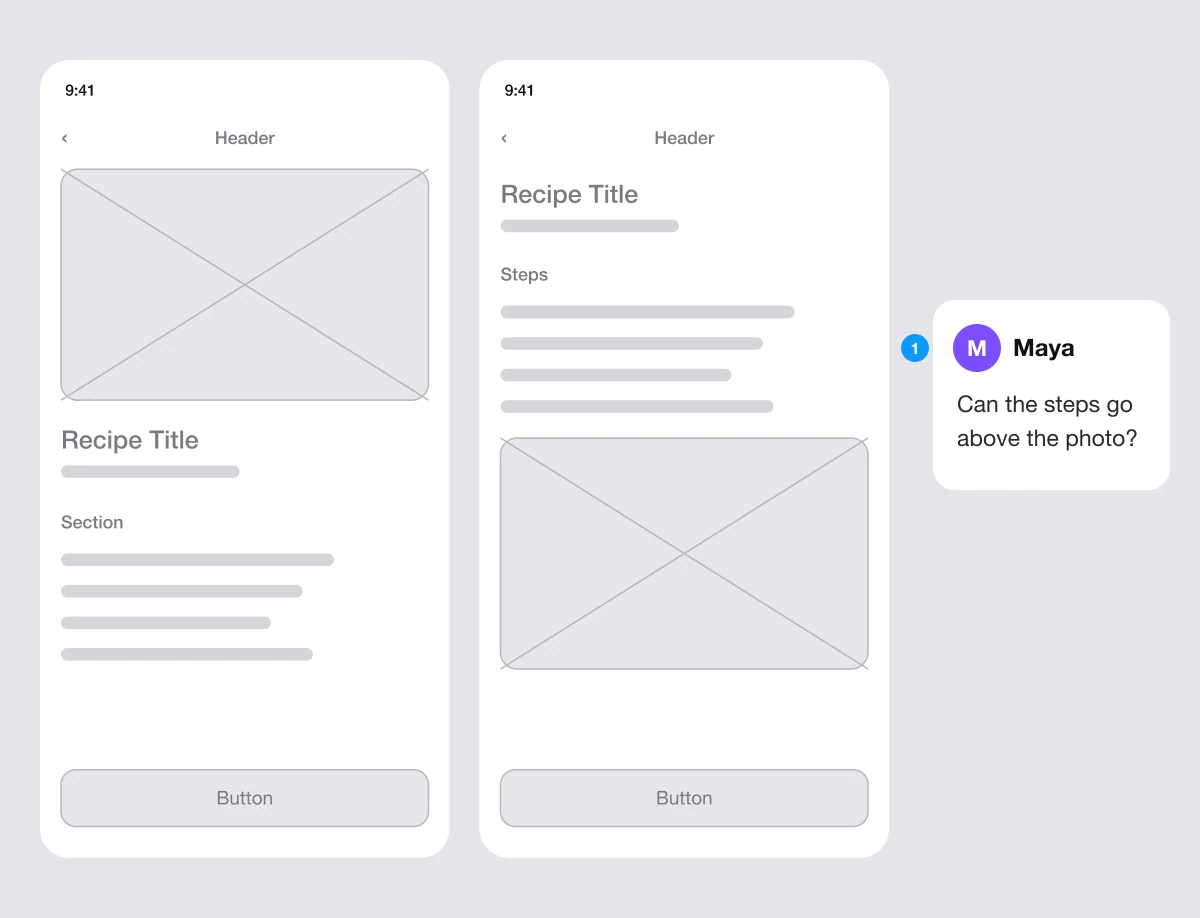
A wireframe is a low fidelity layout: boxes where images go, lines where text goes, a plain rectangle where the button goes. It is right when:
- You are still deciding the layout. Photo first or steps first is a question a wireframe answers in an afternoon.
- You want notes on structure, not color. Gray boxes keep reviewers off the palette. Maya asks whether the steps can go above the photo, which is exactly the note you want at this stage.
- Changing it should take minutes. If moving a section costs an hour, you will stop moving sections.
Where it fails: anything about motion, timing or what happens next. A reviewer who looks at a wireframe of a checkout cannot tell you whether the checkout feels slow.
The prototype: test the flow
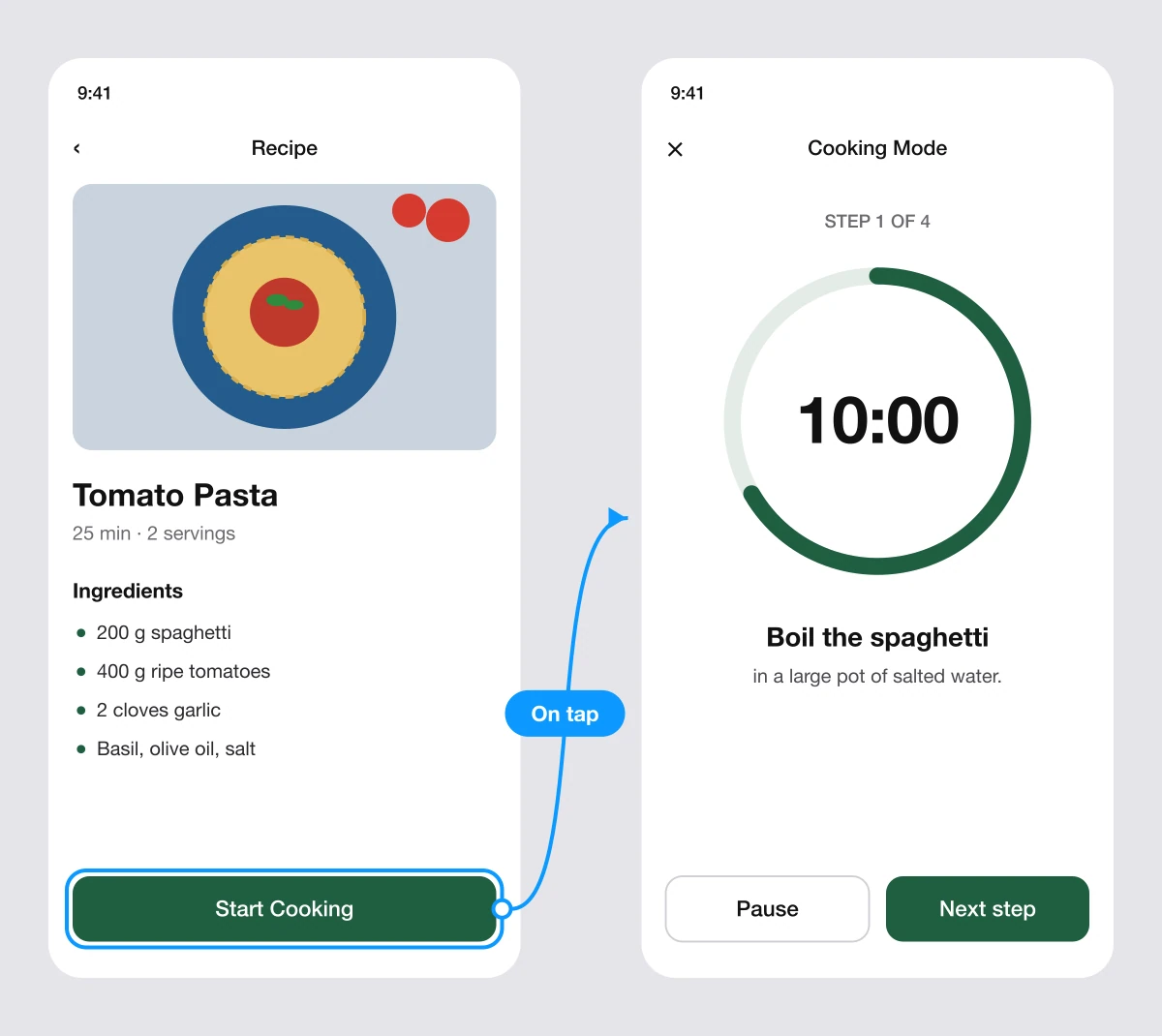
A prototype is an interactive model of the product. In Figma, the button you tap is the hotspot, the blue line that links it to the next screen is the connection, and a chain of connected screens is a flow. It is right when:
- You are testing the flow with real people. Hand someone the phone, ask them to start cooking, and watch where they hesitate.
- Someone has to feel the timing. A 10:00 timer, a loading state or a transition reads very differently in motion than on a still screen.
- The team needs to see it move. Engineers and stakeholders argue less about a flow they have tapped through themselves.
Where it fails: early layout questions. Polish makes people react to the photo and the green, and it makes the team reluctant to throw work away.
Fidelity is a dial, not a type
The two words describe different things, which is why they get mixed up. "Wireframe" is about how finished the screen looks. "Prototype" is about whether it responds. Nielsen Norman Group describes prototype fidelity along three separate dials: interactivity, visuals, and content.
That means you can link gray wireframes together and get a low fidelity prototype, which is often the right move for testing a new flow early. NN/g's paper prototyping method goes further still: a person plays the computer and swaps paper screens by hand. A polished screen that does nothing when tapped is not a prototype, it is a mockup.
| Wireframe | Prototype | |
|---|---|---|
| Question it answers | Where do things go? | Can people get through it? |
| Looks | Gray boxes, lines, placeholder text | Anything from gray to finished |
| Responds to a tap | No | Yes |
| Time to change | Minutes | Longer, links break when screens move |
| Best reviewers | Your team | Real users |
Wireframe or prototype: a decision table
| Situation | Make | Why |
|---|---|---|
| First kickoff, nothing drawn yet | Wireframe | Agree on structure before anyone picks a color |
| Choosing between two layouts | Wireframe | Draw both, compare them side by side |
| Reviewing with a client who fixates on color | Wireframe | Gray removes the distraction |
| Planning content for a page | Wireframe | Boxes show how much text each block can hold |
| Testing a new signup or checkout | Prototype | Only a flow shows where people drop off |
| Checking that a timer or animation feels right | Prototype | Timing cannot be judged on a still screen |
| Handing a flow to engineering | Prototype | They see every screen and every transition |
| Pitching an idea to stakeholders | Prototype | People commit to what they can tap |
| Testing a new flow on day two | Linked wireframes | A low fidelity prototype, fast and cheap to change |
| A single static page with no steps | Wireframe | There is no flow to test |
| Checking a design on a real phone | Prototype | Figma runs it on the device |
| Fixing the copy on one button | Neither | Edit the finished design directly |
Tools that do each well
- Balsamiq builds wireframes with a deliberately sketchy look, so nobody mistakes them for finished design.
- Figma does both in one file: draw gray frames in the Design tab, then link them in the Prototype tab with hotspots and connections, and play the flow on a phone.
- Paper and a pen still work for the earliest prototypes, as NN/g's paper prototyping method shows.
Where the screens come from is changing too. More teams now skip straight from a written spec to working code, which we wrote about in the spec is the new wireframe and the death of the mockup. The question still holds: settle the layout cheaply, then test the flow with people.
FAQ
What is the difference between a wireframe and a prototype?
A wireframe is a static, low fidelity layout that shows where things go on a screen. A prototype is an interactive model that links screens so people can tap through the flow. Wireframes test the layout, prototypes test the flow.
Which comes first, a wireframe or a prototype?
Usually the wireframe. Settle the layout with cheap gray screens first, then link them or finish them into a prototype once the structure stops changing.
Can a wireframe be a prototype?
Yes. Link wireframe screens together so a tap moves to the next one and you have a low fidelity prototype. It is a fast way to test a new flow before any visual design exists.
Is a mockup the same as a prototype?
No. A mockup is a static picture of the finished design. A prototype responds when you tap it. A mockup becomes a prototype once its screens are linked.
Can you make wireframes and prototypes in Figma?
Yes. Draw the wireframe as plain frames, then open the Prototype tab, pick a hotspot such as a button, and drag a connection to the next frame. Present it to play the flow on your screen or phone.
Sources
- Kara Pernice, UX Prototypes: Low Fidelity vs. High Fidelity, Nielsen Norman Group.
- Paper Prototyping: Getting User Data Before You Code, Nielsen Norman Group.
- Guide to prototyping in Figma, Figma Learn: hotspots, connections and flows.
- What is a wireframe?, Balsamiq.
- The Tomato Pasta recipe, its Cooking Mode screen and the note from Maya are invented for the demo.
- First published as a carousel on UX Brainy.